
![How to Reduce Customer Churn with Product Documentation [2026 Guide]](/images/blog/reduce-customer-churn-product-documentation-featured.png)
Most SaaS churn playbooks cover the same things: identify at-risk accounts early, schedule a proactive CS call, offer a discount, redesign your cancellation flow.
None of them go deep on documentation. And that's the gap.
When customers churn, the story most teams tell is: "They weren't a good fit" or "They didn't engage with our CS team." The story the data tells is different: customers who churn almost always share one thing in common. They never discovered what your product could actually do for them.
They used 20-30% of the product's capabilities. They hit a wall, assumed the product couldn't solve their problem, and left.
That's a documentation problem.
This guide covers the framework SaaS teams use to turn product documentation from a reactive help resource into a proactive retention system. You'll see the data behind the documentation-churn connection, the five documentation problems that drive customers away, and a step-by-step framework for fixing them.
Why Documentation Is the Overlooked Churn Lever
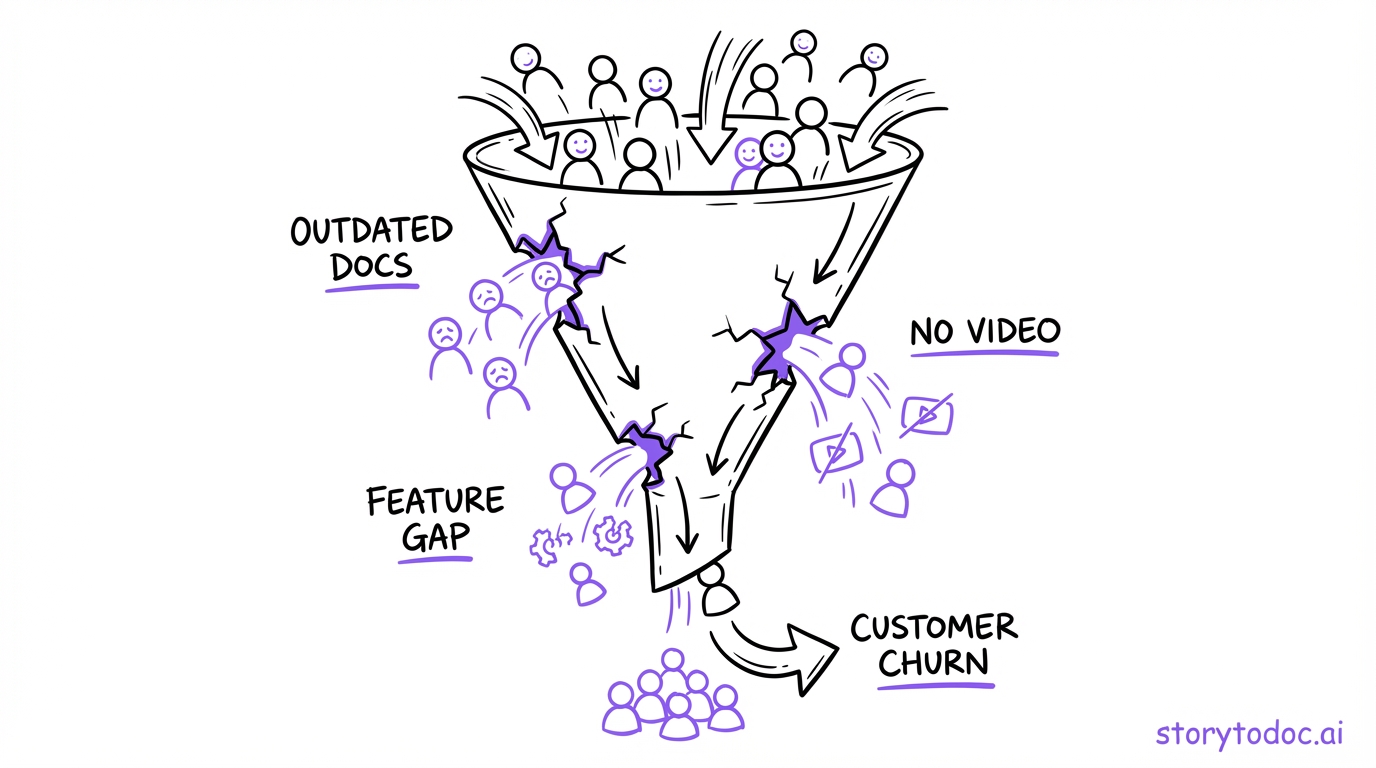
When SaaS leaders review churn data, the conversation usually goes to pricing, product gaps, competitive alternatives, and CS capacity. Documentation rarely comes up.
Here's why it should.
The feature discovery gap
The average SaaS customer uses 20-30% of the features they're paying for. That's not a usage problem. That's a discovery problem.
Customers don't know what they don't know. If they've never seen a feature demonstrated or explained, they can't use it. If your documentation only answers problems (users visit the help center when they're stuck), it never teaches customers what's possible.
The retention data on this is striking. Customers who discover 60% or more of a product's core features have retention rates 2x higher than customers who discover only 20-30%. The difference isn't the product. It's how well customers understand what the product can do.
Feature discovery is driven by documentation. Not tooltips. Not CS calls. Documentation that proactively shows customers what the product does, not just how to fix a specific problem.
The reactive help center problem
Most SaaS help centers are reactive by design. Users search when they're stuck. They find an article. They solve the problem (if the article is current). They close the tab.
This model has a fundamental flaw: it only activates when something goes wrong. It doesn't help customers find features they didn't know to look for. It doesn't guide customers toward the "aha moments" that drive retention.
A reactive help center is a fire extinguisher. You need it when things break. But it does nothing to prevent fires, and it does nothing to help customers get more value out of the product between fires.
Proactive documentation -- a Learning Center embedded in the product, surfacing content before users ask for it -- is what changes the retention curve.
How outdated docs actively drive customers away
There's a more direct way documentation causes churn that doesn't get enough attention.
When a customer follows step-by-step instructions and the screenshots don't match what they're seeing, something specific happens: they don't blame the documentation. They blame themselves. Or they blame the product.
"This software is confusing." "The UI makes no sense." "This is harder than it should be."
Poor documentation creates a trust erosion cycle. Each encounter with wrong or outdated content chips away at the customer's confidence in the product. When that confidence is gone, they're gone. Often before they ever talk to your CS team.
The Documentation-Churn Connection: What the Data Shows
The link between documentation quality and retention is more direct than most SaaS leaders realize.
44% of customers churn due to poor onboarding and documentation
This is the number worth putting in front of your leadership team. Nearly half of all SaaS churn traces back to failures in the onboarding and documentation layer -- not product deficiencies, not pricing, not competitive alternatives.
Customers leave because they don't understand how to get value. That's a solvable problem.
Self-serve support resolves issues 3x faster
Customers who can answer their own questions using help documentation resolve issues faster than customers who wait for a support response. Teams with strong self-serve documentation see 20-66% reductions in support ticket volume.
Faster resolution means less frustration. Less frustration means lower churn.
Feature adoption drives expansion revenue -- and documentation drives feature adoption
The economics of SaaS retention aren't just about preventing cancellations. They're about customers growing within your product: upgrading plans, adding seats, adopting advanced features.
Expansion revenue requires feature adoption. Feature adoption requires awareness. Awareness requires documentation.
The customers who expand are the customers who understand the product well enough to see more value in it. Documentation is what gets them there.
The compounding effect: early documentation vs. late CS intervention
Here's the cost comparison most teams never run.
A CS team intervening at churn risk (scheduling calls, offering concessions, escalating to a senior rep) costs roughly $500-$2,000 per at-risk account. And it happens after trust has already eroded.
Proactive documentation investment -- creating and maintaining a Learning Center with accurate, up-to-date content -- is a one-time creation cost that serves thousands of customers continuously. It prevents the trust erosion before it starts.
The math favors documentation. The execution is harder, which is why most teams default to CS intervention.
The 5 Documentation Problems That Cause Churn
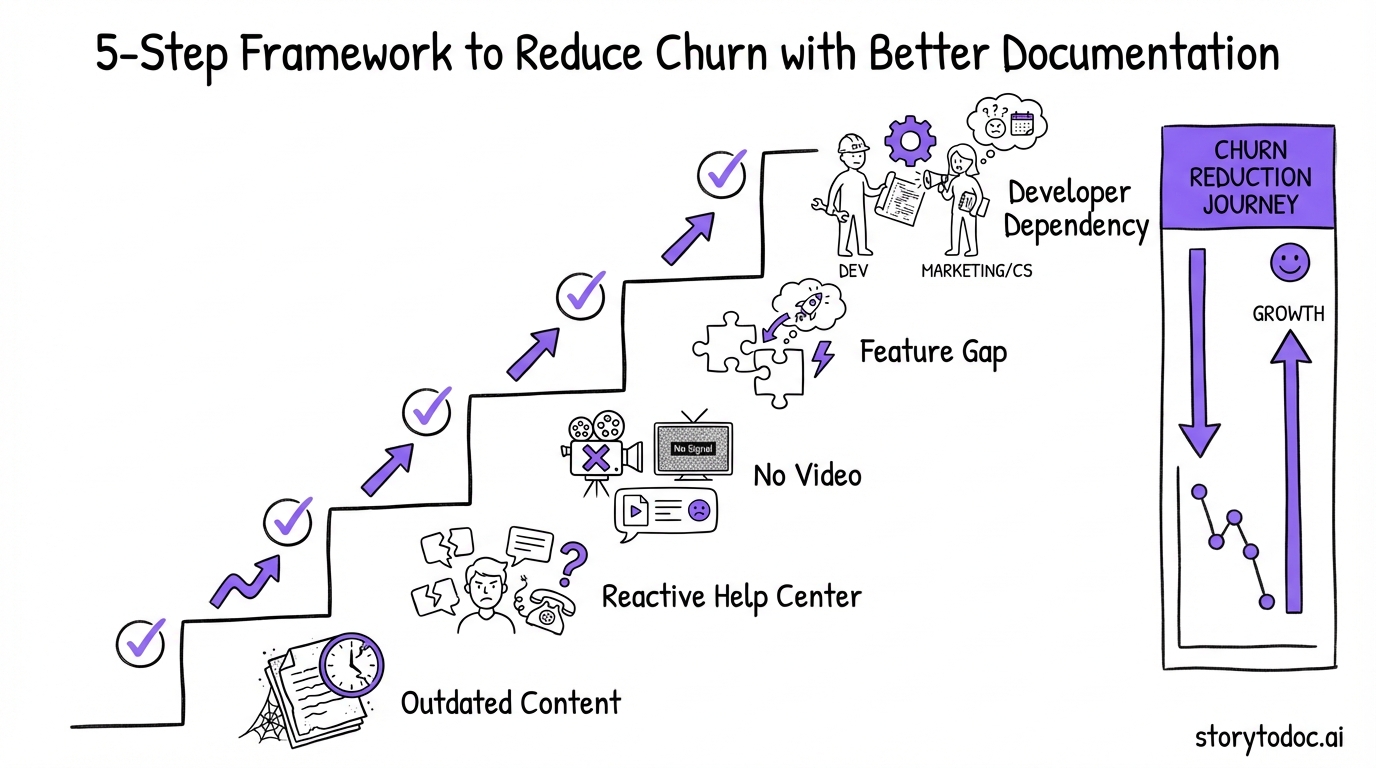
If you want to know whether your documentation is a churn risk, check these five areas.
1. Outdated content that doesn't match the product UI
Your product shipped an update two months ago. The screenshots in your help center still show the old interface. A customer follows the steps, looks at the screen, and can't match what they're reading to what they're seeing.
This is the most common documentation failure in SaaS. 80% of SaaS help content goes stale within months of a product launch. Every product update creates a new set of gaps between what your documentation says and what your product actually does.
The fix: documentation that updates automatically when the product changes. Not a "documentation review process." Automatic updates.
2. A help center that only answers problems, not teaches features
If the only time a customer visits your help center is when they're stuck, the help center is only catching problems -- it's not building product mastery.
Run this check: look at your 20 most-viewed help articles. What triggered those visits? In most cases, it's users searching for something they're struggling with. That's fine. But are there any proactive articles -- "5 things you can do with [Feature X] that most teams miss" -- in your top 20? If not, your documentation is entirely reactive.
Proactive documentation teaches customers what's possible, not just how to fix what's broken.
3. No video -- users don't read long articles when they're frustrated
When a customer is stuck on a task and feeling frustrated, they don't want to read 800 words. They want to watch 90 seconds and see exactly what to do.
Video is the fastest format for frustrated users. Text is better for reference and learning. PDF is best for offline access and team training. If your documentation is text-only, you're making the frustrated-user experience harder than it needs to be.
The three-format standard (video + article + PDF) serves every customer type at every moment in their journey.
4. No way for users to discover features they don't know exist
This is the feature discovery gap in practice. If your documentation only answers questions users already have, it can't teach them about features they've never considered.
A proactive Learning Center embedded in the product -- visible without users searching for it -- is what closes this gap. When users open a section of the product and see a brief walkthrough of what they can do there, feature discovery happens naturally.
The alternative is customers quietly using 25% of what they're paying for, not finding the value they expected, and churning.
5. Documentation that requires a developer to update
If keeping your documentation current requires engineering involvement, it won't stay current. It's that simple.
When a product update ships and updating the help center means filing a ticket, waiting for a developer, and going through a review process, the documentation falls behind. CS and marketing teams deprioritize it. Content gets stale. The trust erosion cycle starts.
Documentation tools and processes that give non-technical teams direct control over content updates are a prerequisite for documentation that actually reduces churn.
How to Build Documentation That Reduces Churn
This is the framework. Five steps, in order.
Step 1: Map your golden path features
Your golden path is the 3-5 features that predict whether a customer reaches 90-day retention. Look at your cohort data: what do customers who renew at high rates do in their first 30 days that customers who churn don't?
In most SaaS products, 3-5 features are highly correlated with retention. Customers who use them stay. Customers who don't, leave. Your documentation investment should concentrate on these features first.
Step 2: Create three-format documentation for each golden path feature
For each feature in your golden path, build out three formats:
- 90-120 second video showing how to use the feature from start to finish
- Step-by-step article with screenshots for users who prefer text
- PDF guide for customers who want offline reference or share guides with their team
If you're creating these from screen recordings, one recording should generate all three formats. This is the most efficient approach and the one that keeps all three in sync when updates happen.
Step 3: Embed in your help center and add a proactive Learning Center
Get the documentation into two places: where users search (your help center) and where users work (inside your product).
Embedding in Zendesk, Intercom, or Confluence is straightforward. Adding an in-product Learning Center is a larger lift but delivers significantly more value for feature discovery. A Learning Center surfaces relevant content before users ask for it -- while they're in the product, doing the work.
The combination of reactive help center content and proactive in-product content is what moves the retention curve.
Step 4: Set up auto-updates so content never goes stale
This is the step that separates documentation that reduces churn from documentation that creates churn risk.
When your product ships an update, what happens to your documentation? If the answer is "we schedule a documentation review sprint," your content will fall behind. Sprints get delayed. Reviews get deprioritized. Updates ship faster than reviews happen.
Auto-updating documentation -- content that detects product UI changes and updates all formats automatically -- is the only sustainable approach for teams shipping at modern SaaS cadences.
Step 5: Track documentation impact on feature adoption and retention
Close the feedback loop. Once your documentation is live and embedded, measure:
- Feature adoption rate by cohort: Do customers who engage with documentation for Feature X actually use Feature X at higher rates?
- 90-day retention by documentation engagement: Do customers who view more documentation stay longer?
- Support ticket volume for documented features: Does strong documentation correlate with fewer tickets on those features?
These metrics will tell you which documentation is working and where to invest next. They also give you data to bring to leadership when you're making the case for documentation investment.
Reactive vs. Proactive Documentation: The Key Distinction
This distinction is the core of the churn-reduction framework.
Reactive documentation: the help center
Reactive documentation is your help center. Users search when they're stuck. They find an article. If the article is accurate and well-written, they solve the problem and move on.
This is essential. Every SaaS team needs a strong help center. But reactive documentation has a ceiling: it only activates when users are already struggling. It doesn't help customers discover value they haven't thought to look for.
Proactive documentation: the Learning Center
Proactive documentation is a Learning Center embedded in your product. It surfaces relevant training and how-to content while users are working, without them searching for it.
When a customer opens a section of your product for the first time, a contextual panel shows them what's possible there. When a customer hasn't used a key feature in 30 days, a prompt surfaces a short tutorial. When a new feature ships, a learning module introduces it before customers ask what changed.
This is what drives feature discovery. This is what gets customers from 20-30% product utilization to 60%+. This is what the retention data shows.
Why you need both
A reactive help center catches customers who are stuck. A proactive Learning Center builds customers who are confident.
You need both because different customers interact differently with documentation. Some users proactively explore your Learning Center. Others only look up documentation when something breaks. The best retention strategy serves both.
Real example: before and after proactive documentation
Before: A SaaS team's help center has 200 articles covering every feature. Average customer visits the help center 1.2 times per month. Feature discovery rate sits at 28%. 90-day churn is 12%.
After: The same team adds a Learning Center embedded in their product, with video-first documentation for their 5 golden path features. Average customer engages with Learning Center content 3-4 times in their first 30 days. Feature discovery rate climbs to 61%. 90-day churn drops to 7%.
The product didn't change. The pricing didn't change. The documentation did.
How to Measure Documentation's Impact on Churn
You can't improve what you don't measure. Here's the measurement framework.
Metrics to track
Primary metrics (directly tied to churn): - 90-day retention rate, segmented by documentation engagement vs. no engagement - Feature adoption rate for documented features - Customer health score correlation with help center usage
Leading indicators (tell you early if documentation is working): - Help center views per customer in first 30 days - Learning Center engagement rate (% of new users who interact with at least one piece of content) - Average features discovered per customer at 30 and 90 days
Documentation quality metrics (tell you if your content is good): - Search result click-through rate in your help center - Thumbs up/down or satisfaction ratings on individual articles - Support ticket volume on topics you've documented (should decrease over time)
How to connect your help center data to your CRM
Most teams track help center data and CRM data in silos. Connecting them reveals the full picture.
The simplest approach: export help center engagement data weekly (views, searches, no-result searches) and match it to customer IDs in your CRM. Tag customers by documentation engagement level. Run cohort analysis on retention rates by engagement level.
The data will show you which customers are at churn risk based on documentation engagement -- before they tell you they're unhappy.
Quick Wins: What You Can Do This Week
If this framework feels large, here's where to start. These are actionable in days, not months.
Audit your top 10 most-viewed help articles. Are they accurate and up-to-date? Do the screenshots match the current UI? This audit will tell you immediately whether you have a documentation debt problem.
Identify your 5 golden path features. What are the features that predict whether a customer stays past 90 days? Ask your best CS team members. Look at usage data for your highest-retention cohorts. Find the 5 features that matter most.
Add video to your 3 highest-ticket topics. What are the top 3 support questions your team answers every week? For each one, record a 90-second video showing the answer. Embed it in the relevant help center article. Watch ticket volume on those topics over the next 30 days.
Map which features correlate with retention. Pull your cohort data and look at feature usage vs. renewal rates. The correlation will point directly to where your documentation investment will have the highest return.
Conclusion
The SaaS teams that crack retention aren't winning because of better CS outreach or smarter cancellation flows. They're winning because they build documentation systems that proactively teach customers how to get value.
Customers who understand your product stay. Customers who discover its full capability expand. Documentation is what builds that understanding and enables that discovery.
The framework here is straightforward: find the features that predict retention, build three-format documentation for each, embed it where customers work, make sure it stays current automatically, and measure the impact.
The compounding effect of doing this well is significant. Every customer who finds value in your product because of strong documentation is a customer who doesn't need an expensive CS intervention. Every feature discovered through proactive learning is a reason to stay.
The teams that get this right will tell you the same thing: start with documentation, measure the retention impact, and let the data make the case for the investment.
In Doc We Trust.

![Video Documentation Service: The Complete Guide for SaaS Teams [2026]](/images/blog/video-documentation-service-saas-guide-featured.png)
![10 Product Documentation Tools for SaaS [Compared 2026]](/images/blog/product-documentation-software-saas-featured.png)